Best overall
Uplift V3 Review: The Standing Desk We Recommend Most
By Nora Brandt · Senior writer
Last updated · Published
We earn commissions from qualifying purchases made through links on this site, at no extra cost to you. This never affects our rankings or verdicts — see our editorial standards.
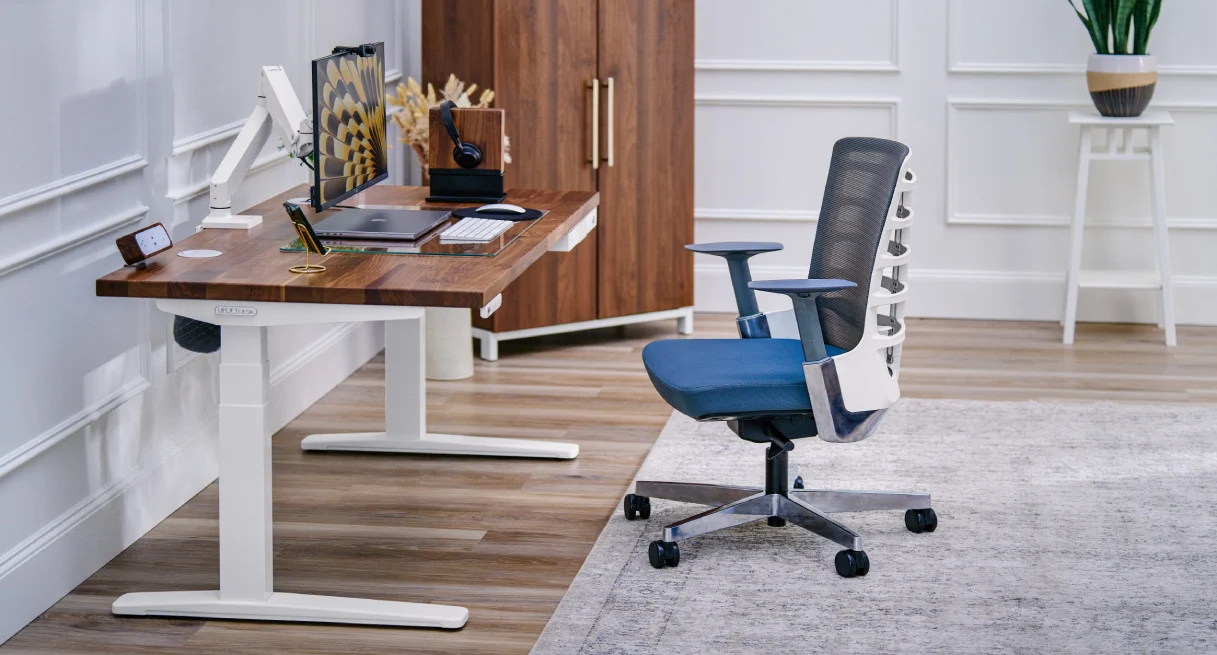
Verdict: Uplift's V3 replaces the V2 with a sturdier frame and far easier assembly at the same $599 starting price — it's the easiest desk in the category to recommend.
The verdict up front
The Uplift V3 is the desk we recommend to most buyers, and the reasoning is boring in the best way. It has the strongest frame design in its class, a 15-year all-inclusive warranty that only the Flexispot E7 Pro matches at a lower price, and the deepest accessory catalog of any standing desk brand. At around $599 it costs real money, but it is priced like a desk you buy once and keep through several jobs.
It is not the right desk for everyone. If your budget stops around $450, the E7 Pro delivers most of the same strengths for less, with an even higher weight capacity. If you run a single laptop and monitor and just want to try standing, the Vivo Electric 43“ does the job at a third of the price. And if you are very tall, read the height-range section below before ordering, because the V3’s maximum height is slightly lower than the old V2’s.
What changed from the V2
In mid-2025 Uplift retired both the V2 and the V2 Commercial and consolidated the line into a single V3 frame. The changes that matter:
- A reinforced frame with a stability plate. The V3 adds bracing low on the frame specifically to cut lateral sway at standing height.
- A faster motor. The dual-motor system moves at about 2 inches per second, roughly 33% quicker than the V2.
- Cable management included. The V3 ships with a cable manager that used to be a paid add-on, and that most competitors still charge for.
- Dramatically simpler assembly. The screw count dropped from 32 to 16. Uplift claims about five minutes of assembly, and quick setup is one of the most consistent themes in early owner reviews of the V3.
The 355 lb weight capacity and the 15-year all-inclusive warranty carry over from the V2 unchanged.
Frame and stability
Wobble is the number-one reason people regret a cheap standing desk, so it is the first thing to judge here. The V3 gives you a dual-motor, three-stage frame with that added stability plate, and the independent coverage backs the design up. Reviewers at TechRadar and Tom’s Guide, who each spent weeks with the desk, describe the frame as rock solid at standing height. Wirecutter’s stability checks found only slight front-to-back movement at maximum height, a difference they characterized as something you would notice only if your job were shaking desks for comparison.
Owner feedback points the same direction. Across more than 21,000 reviews the V3 and its predecessor average 4.8 out of 5, and steadiness under dual-monitor arms is one of the most repeated points of praise. That is unusual. For most desks in this category, wobble at full extension is the most common complaint, and with the Uplift it barely registers.
The 355 lb capacity is more than any home setup realistically needs, though it is worth knowing the cheaper E7 Pro is rated higher at 440 lb.
Motor, height range, and everyday use
The height range runs from 22.6 to 48.7 inches on three-stage legs. The low end is genuinely low, which matters for shorter users and for anyone who wants correct ergonomic typing height while seated. Our ergonomic setup guide covers how to find your numbers; once you have them, the keypad stores four presets so you never hunt for the right height again.
At roughly 48 dB during lifts, the V3 is quiet enough for a shared office or a call in progress. The 2-inch-per-second travel means a full sit-to-stand transition takes a few seconds, which sounds trivial but genuinely affects whether you actually switch positions through the day. If you are still working out how often to alternate, see our guide on how long you should stand.
One honest caveat for tall users: the V3 tops out at 48.7 inches, a bit below the old V2’s roughly 49.9 inches. Most people will never reach either ceiling. If you are around 6’4“ or taller and type with raised keyboard trays or thick desktops, check your required height first, since the remaining stock of V2 frames reaches slightly higher.
Desktops, options, and build
This is where Uplift pulls away from every rival. Desktops run from 42 to 80 inches wide in multiple depths, across laminate, bamboo, rubberwood, and solid wood options, and the accessory catalog covers wire trays, hooks, drawers, CPU holders, and monitor arms. Whatever setup problem you have, Uplift probably sells the fix. The downside of all that choice is that the configurator makes it easy to spend well past the $599 starting price.
Assembly and warranty
The 16-screw assembly is a real improvement, and one that owner reviews confirm rather than merely tolerate. Where standing-desk reviews usually contain a thick vein of assembly complaints, the V3’s setup is regularly cited as a highlight.
The 15-year all-inclusive warranty covers the frame, motors, and electronics. On a mechanical product with motors that you plan to keep for a decade, warranty length is not fine print. It is a core spec, and 15 years is the best in the category alongside Flexispot.
How it compares
Against the Flexispot E7 Pro, the Uplift wins on finishes, accessories, and low-end height range, while the Flexispot wins on price and raw capacity. The full breakdown is in our Uplift V3 vs Flexispot E7 Pro comparison, but the short version is that the E7 Pro gives up little for the savings.
Against the Fully Jarvis Bamboo, now sold by Herman Miller at around $1,036, the Uplift is the stronger buy on warranty and price, while the Jarvis counters with its bamboo top. See the Uplift V3 vs Fully Jarvis comparison for the details.
Bottom line
The V3 took the desk that already led the category and fixed its two real annoyances, slow assembly and paid cable management, without raising the price. Anyone who wants one desk that will outlast several laptops should start here. If you are still deciding whether this category fits you at all, our standing desk buying guide walks through the decision from the beginning.
Specifications
| Height range | 22.6"–48.7" (3-stage legs) |
|---|---|
| Weight capacity | 355 lb |
| Desktop sizes | 42"–80" wide, multiple depths |
| Motor | Dual motor, ~2"/sec (≈33% faster than V2) |
| Lift noise | ≈48 dB at lift |
| Warranty | 15 years |